Can You Record Live TV on IPTV? Catch-Up and DVR Explained
Recording on IPTV works differently from a Sky box — it happens in the player app, not the service. Here is what catch-up gives you, how to set up recording, and where each falls short.
If you are coming from a Sky box, recording is something you take for granted — you press record and the box stores it. IPTV handles this differently, and the difference is worth understanding before you rely on it.
For New Zealand viewers this matters more than it might elsewhere, because so much overseas sport happens overnight here.
Two different things people call “recording”
Catch-up is a feature of the service. Where available, you can scroll back on a channel and play something that already aired — typically anything from the last day or few days, depending on the channel. Nothing is stored on your device; you are requesting an earlier point in the stream.
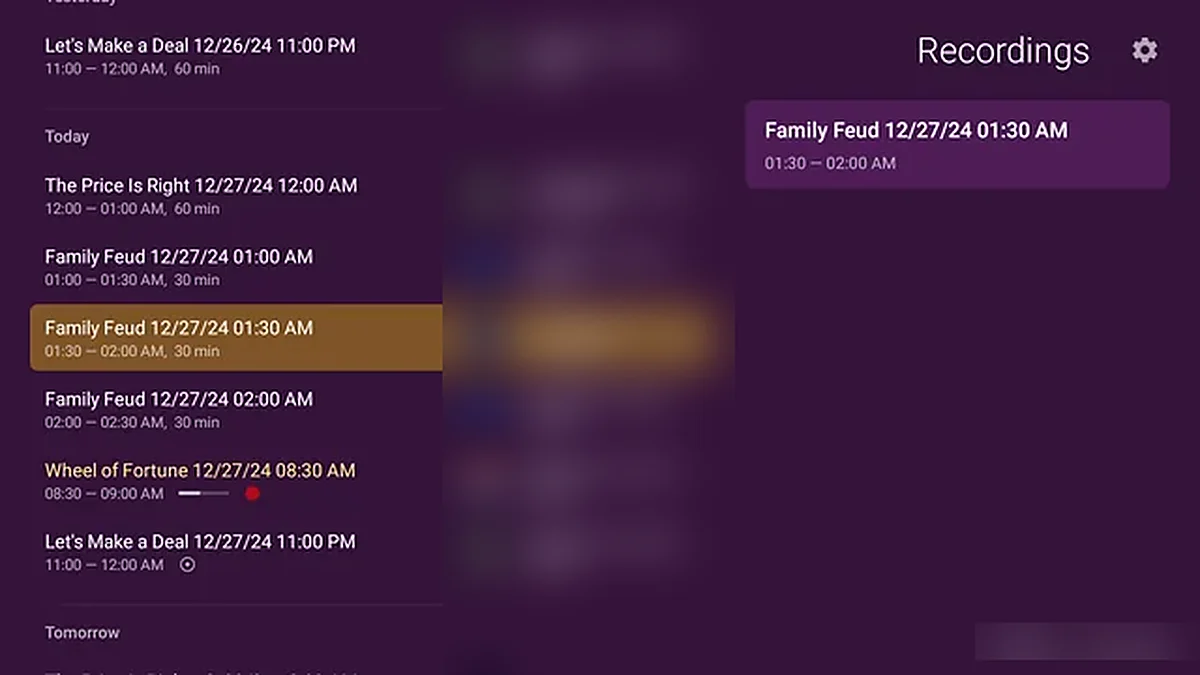
Recording (DVR) is a feature of your player app. The app captures the stream to storage on your device or an attached drive, and the file is yours until you delete it.
The practical distinction: catch-up requires no setup but is not available on every channel, and the window is limited. Recording works on anything you can watch but needs storage and, for scheduled recordings, a device that is awake when the programme airs.
Using catch-up
This is the easy one. In most player apps, open the guide, scroll back to an earlier time slot, and select a programme. If catch-up is available for that channel, it plays.
Some apps show a small icon or a different colour on channels that support it. If a programme does not play when you select it from the past, that channel does not have catch-up — nothing is broken.
The limitation is coverage. Catch-up is available on a subset of channels, not all of them, and this is true of every provider. If it matters for a specific channel, check before you rely on it.
Setting up recording
Recording capability depends entirely on which app you use, and the apps differ a lot here.
TiviMate (Android, Android TV, Fire TV) has the best recording of the common players. It supports scheduled recording from the guide, series recording, and recording to internal storage or a connected USB drive. If recording matters to you, this is the app to use. The full version is a paid upgrade, which is worth it if DVR is the reason you are there.
IPTV Smarters Pro includes basic recording — generally start-and-stop on what is playing rather than sophisticated scheduling.
XCIPTV supports recording with reasonable scheduling.
Smart TV apps (IBO Player, Duplex, Smarters Player Lite) mostly do not record, because TV app platforms are restrictive about storage. If you are on a Samsung or LG TV and want DVR, you will generally need an Android box or Fire TV Stick alongside it.
Apple devices are limited here too. iOS and tvOS restrict this kind of storage access, so recording is largely not available.
Our setup guide lists which apps suit which device.
Scheduling a recording in TiviMate
The rough sequence, which is similar in most apps that support it:
- Open the programme guide and find the show
- Select it — you get a menu rather than immediate playback
- Choose Record, or Schedule recording
- For a series, choose the series option if offered
- Check the storage location in Settings → Recordings
The critical detail people miss: the device has to be on and awake when the programme airs. A Fire TV Stick in deep sleep does not wake itself up to record. If you are recording something at 3am, leave the device powered on. This is the most common reason a scheduled recording produces nothing.
Storage
Recordings are large. Rough figures:
| Quality | Per hour |
|---|---|
| HD | 3–4 GB |
| Full HD, high bitrate | 5–6 GB |
| 4K | 10–15 GB |
A Fire TV Stick with 8 GB of internal storage, most of which is already used, holds about one HD match. If you intend to record regularly, connect a USB drive — an Android TV box with a USB port is much better suited to this than a stick.
Check where the app is writing. Apps default to internal storage, and the first you hear about it being full is usually a recording that stopped halfway.
What this is good for in New Zealand
The obvious case is overseas sport. A 3am kickoff recorded and watched at a reasonable hour is the single most useful thing DVR does from this time zone. Set it the night before, leave the device on, and stay off social media in the morning.
The other case is ordinary scheduling — recording a series that airs while you are at work, exactly as you would have with a Sky box.
The honest limitations
Recording depends on your device staying awake. No app can work around this.
Catch-up is not universal. It is available on a subset of channels, and the window varies.
Smart TV apps generally cannot record. If DVR matters and you are on a Samsung or LG, plan on adding a cheap Android box.
Recordings are files on your device. If the device dies or you factory reset it, they are gone. They do not live in the cloud.
A failed recording is usually silent. Apps do not reliably tell you a scheduled recording did not happen. For something you genuinely care about, check it recorded rather than assuming.
Practical advice
If recording is a significant part of why you want IPTV, use an Android TV box or Fire TV Stick with TiviMate and a USB drive. That combination handles it properly.
If you only occasionally want to catch something that already aired, catch-up is likely enough and needs no setup at all.
Either way it is worth testing with something you do not care about before you rely on it for something you do. Record a random programme tonight, check it played back tomorrow, and then you know.
The setup guide covers getting each device running, and the FAQ answers the other common questions.
Common questions
Can you record live TV on IPTV?
Yes, but recording is handled by the player app rather than the service. TiviMate on Android or Fire TV has the strongest scheduled and series recording. Apple TV and most Smart TV apps cannot record, because those platforms restrict the storage access DVR requires.
Does catch-up work on every channel?
No, and that is true of every provider. Catch-up is available on a subset of channels with a limited window, typically the last day or few days. If it matters for one particular channel, confirm before relying on it rather than assuming.
Do I need a USB drive to record IPTV?
Not always, but usually worth it. Recordings run 3–4 GB per hour in HD and 10–15 GB in 4K, so a Fire TV Stick’s internal storage holds roughly one match. An Android TV box with a USB drive attached is far better suited to regular recording.